126 — OOPS in TypeScript, Class and Object (Greeter Anatomy to Three Instances)
Full companion narrative for Way2Future's OOPS in TypeScript — class anatomy through Greeter and Circle diagrams, the student live-coding drill with this and new, and the seven-row object-versus-class table
Video: 126 · OOPS in TypeScript | Class and Object in TypeScript | Full Explained with Examples · watch · ~29:17 · Way2Future
Source: this is a written companion to the video. Part of the Favorite TypeScript Videos curated path, module 05 (objects and interfaces) — the drill pass for 124’s theory pass: blueprint and instance, knows-versus-does, and first instantiation re-taught hands-on in
class.ts. The typed-fields-first habit matches theGreetPropscontract in 125, the multi-instance payoff raises the duplication question 124 answers with a superclass, and the explicit annotations here are the discipline 127 enforces.
A Windows desktop session (PROGRAMMER code-art wallpaper, 03-02-2023 taskbar) with the creator narrating in Hinglish over three visual modes: annotated theory slides in an image viewer (Greeter anatomy, UML Circle, object-versus-class table), VS Code on class.ts with a PowerShell tsc loop, and a Live Server browser console showing compiled output. Workflow throughout: edit class.ts, run tsc class.ts, refresh the browser. His framing: TypeScript supports OOP features — classes, interfaces — the way Java and C++ developers already know them, and this video covers class and object first, remaining concepts after. Delivery note: the auto-transcript mixes Hindi and English with heavy mistranscription, so the code below is reconstructed from on-screen frames, which are the reliable record.

a class is a blueprint; fields, constructor, and methods are its parts
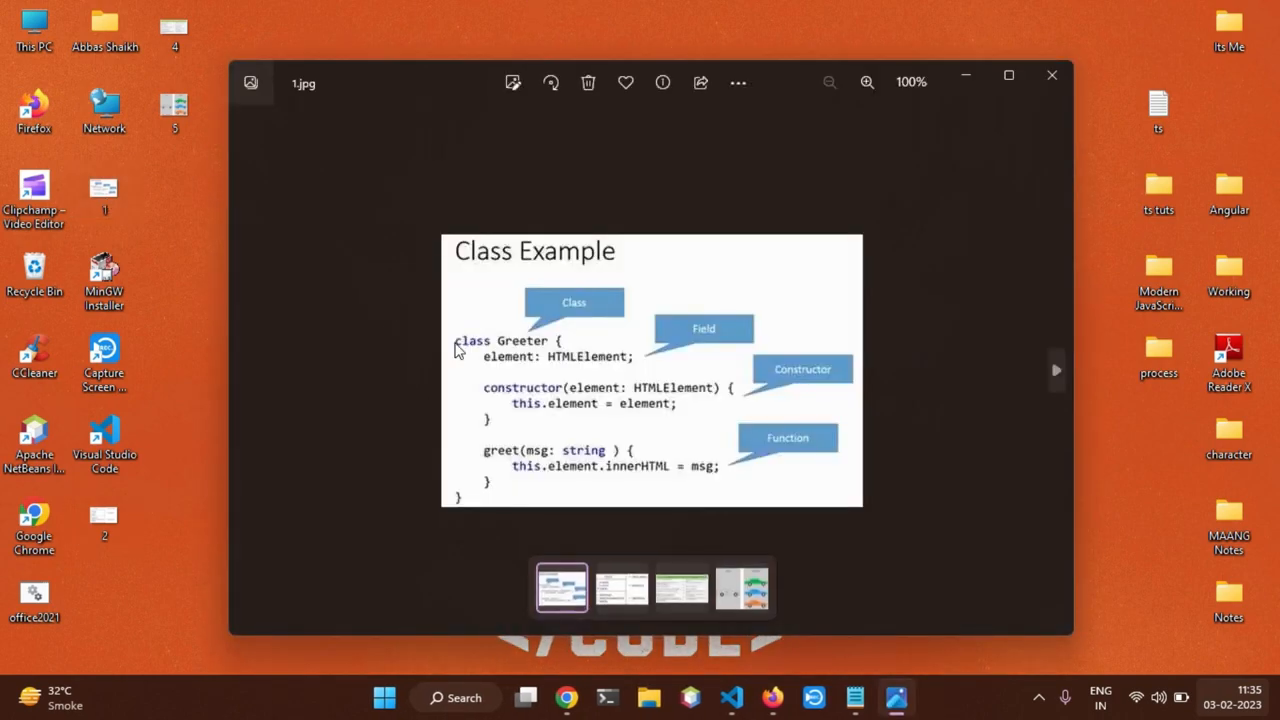
“A class is a blueprint of creating object” carrying data members (fields and variables), a constructor, and methods. The annotated Greeter slide labels each part: class Greeter (the class), element: HTMLElement (field), constructor(element: HTMLElement) assigning through this (constructor), greet(msg: string) writing innerHTML (function and method). A class encapsulates data “for the object” — the logic lives in the blueprint, the data lives in instances.
// annotated Greeter: class / field / constructor / method
class Greeter {
	element: HTMLElement; // field (data member)
	constructor(element: HTMLElement) {
		this.element = element;
	}
	greet(msg: string): void {
		// method
		this.element.innerHTML = msg;
	}
}
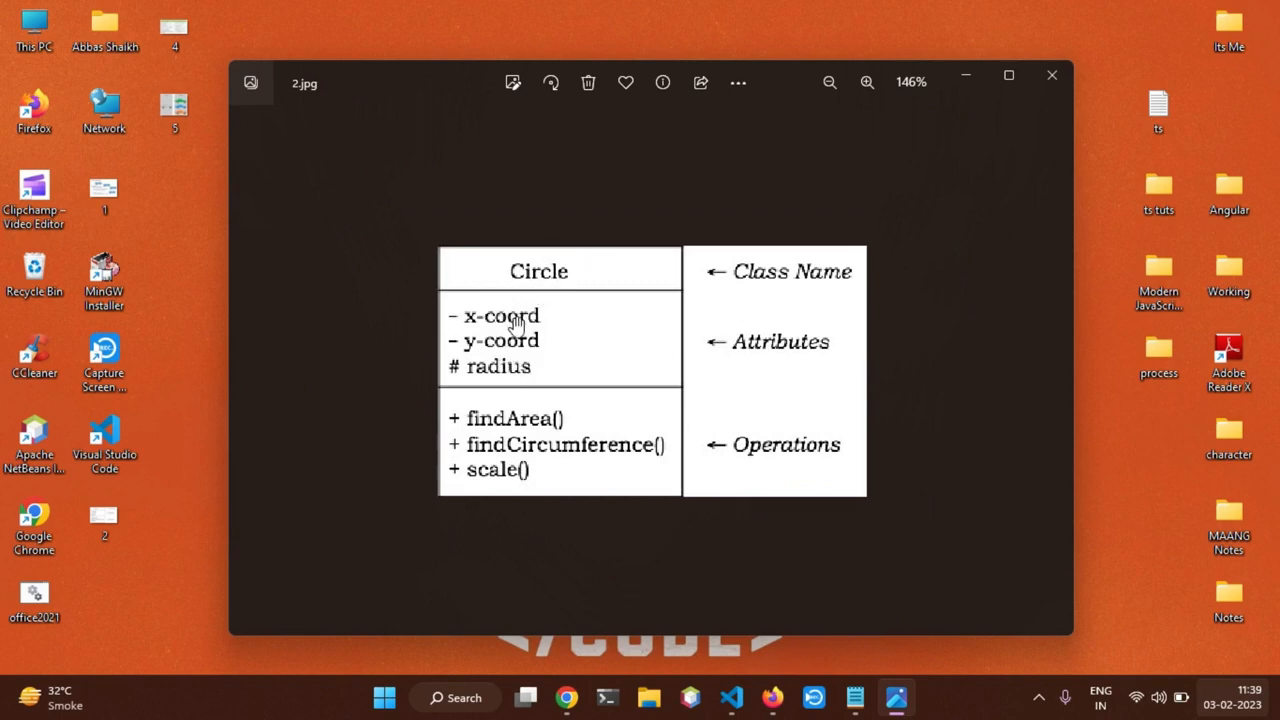
UML anatomy: name, attributes, operations
The Circle diagram reads like a UML class box: class name Circle; attributes for coordinates and radius; operations findArea(), findCircumference(), and scale(). The Mercedes, BMW, and Audi aside makes the same point concretely — one car blueprint, many manufactured objects. Animal and coordinate examples reinforce that attributes are the stored values and operations are the behaviors.
// Circle box transcribed to TypeScript
class Circle {
	private xCoord: number; // attribute: x-coordinate
	private yCoord: number; // attribute: y-coordinate
	protected radius: number; // attribute: radius
	findArea(): number {
		return Math.PI * this.radius ** 2;
	} // operation
	findCircumference(): number {
		return 2 * Math.PI * this.radius;
	}
	scale(f: number): void {
		this.radius *= f;
	}
}
the student class: typed fields, first instantiation
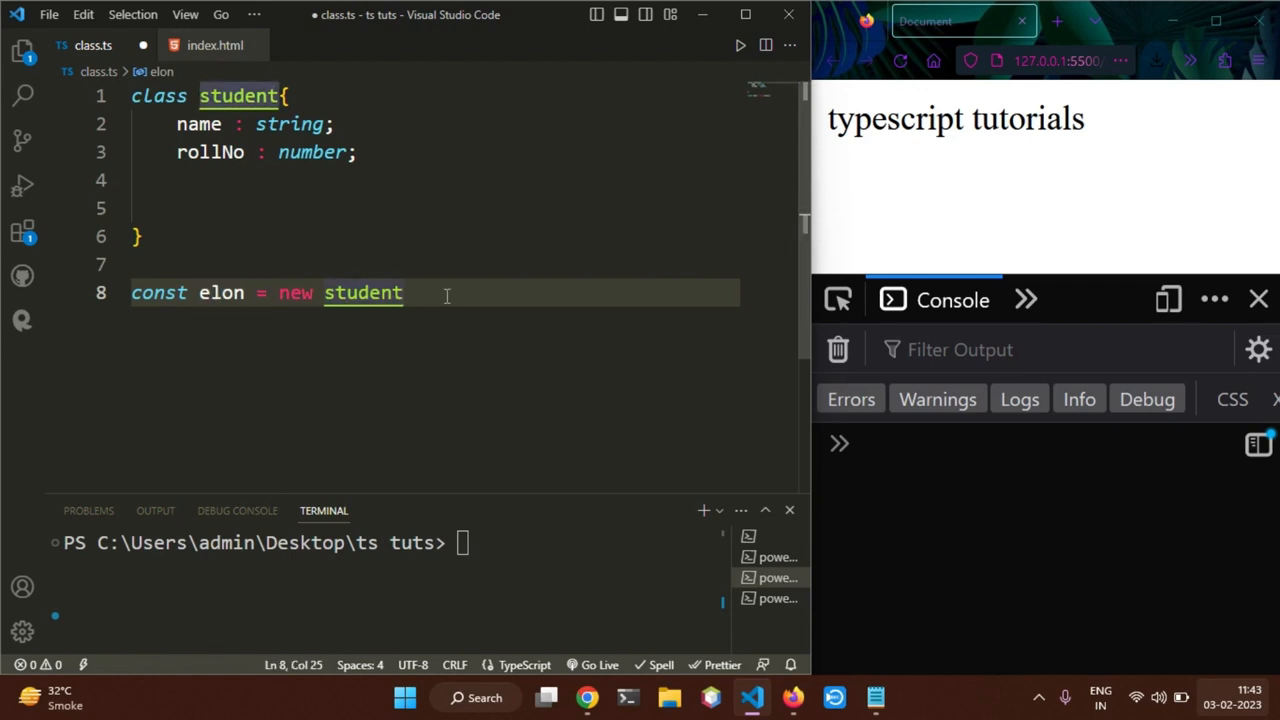
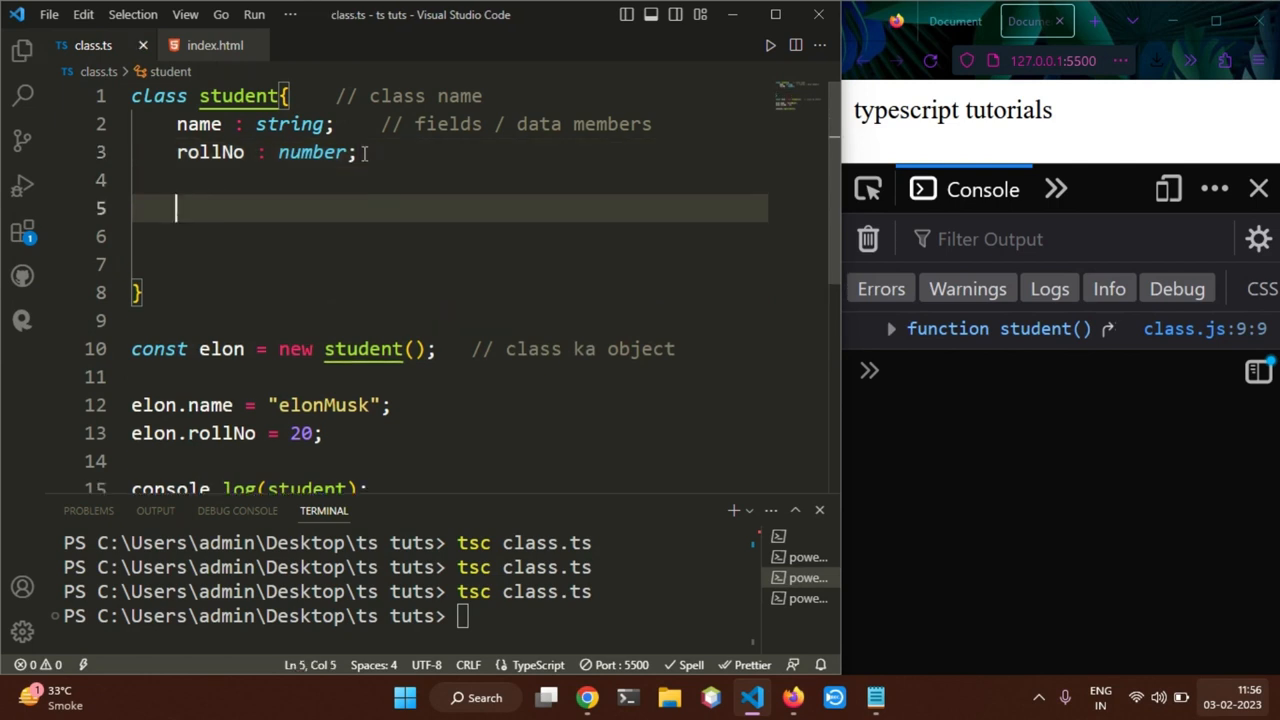
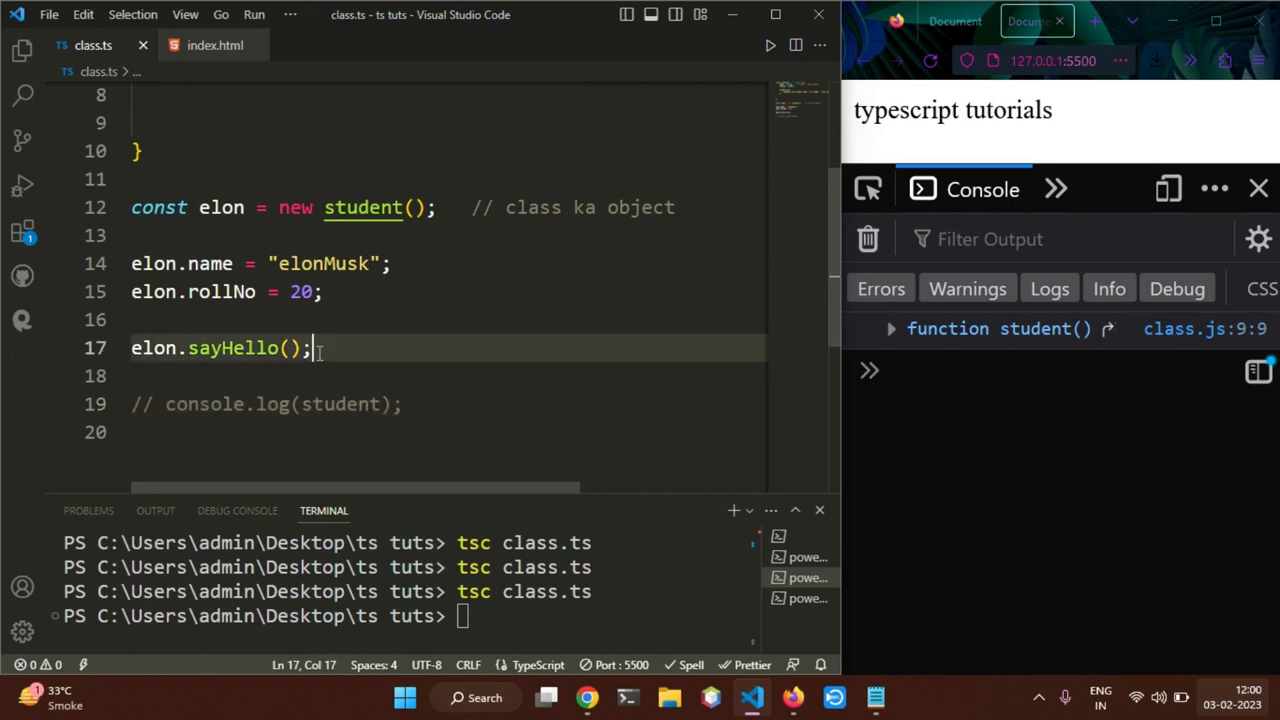
Live coding starts in VS Code: class student { name: string; rollNo: number; } — fields declared with types, no inference games — then const elon = new student with new as the instantiation keyword. Assigning a wrong-typed value errors immediately (“is not assignable to the type”). Values follow: elon.name = "elonMusk" with elon.rollNo = 20, Hinglish comments (// class ka object) marking each step. Declaring GreetProps fields with types in 125 is the same typed-shape-first habit applied to props.
// class.ts: fields + first object
class student {
	name: string; // fields / data members
	rollNo: number;
}
const elon = new student(); // class ka object
// elon.name = 20; // error: not assignable to string
elon.name = "elonMusk";
elon.rollNo = 20;
methods and this: behavior that reads the instance
A sayHello() method is added that prints the instance’s own data — the student name and roll number — via this.name and this.rollNo, where “this refers to the current” object. Called as elon.sayHello(), it prints the elon values to the browser console. One frame catches the workflow honestly: the new call is typed while the console still shows the stale pre-method compile — edit running ahead of tsc.
// method using this
class student {
	name: string;
	rollNo: number;
	sayHello(): void {
		console.log("student name " + this.name + ", roll no is " + this.rollNo);
	}
}
elon.sayHello(); // "student name elonMusk, roll no is 20"
one class, many objects: steve and mark join elon
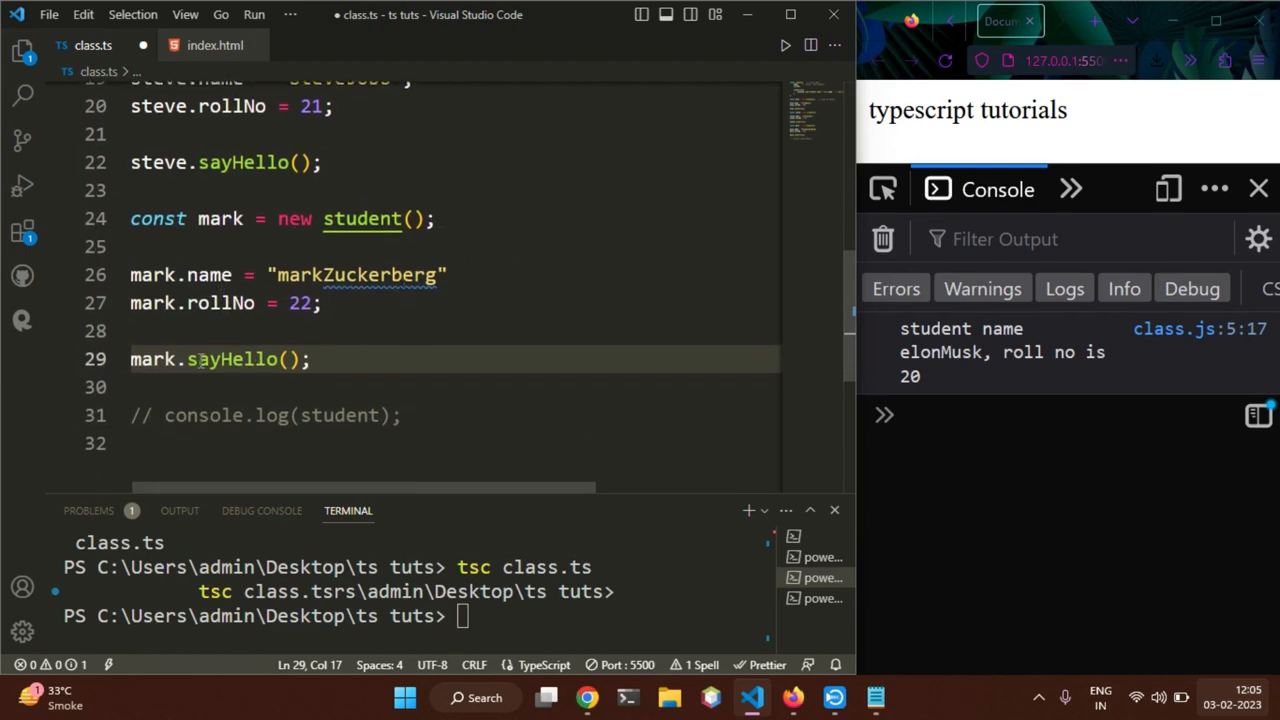
The payoff for the blueprint idea: const steve = new student() (rollNo 21) and const mark = new student() ("markZuckerberg", 22), each calling sayHello() and printing its own values. Same class, three independent states — “multiple objects” from one declaration. Inference note along the way: field types declared once govern every instance. The open question this raises — what happens when several student-like classes duplicate shape — is answered by the superclass extraction in 124.
// three instances, one class
const steve = new student();
steve.name = "steveJobs"; // rollNo 21
steve.sayHello();
const mark = new student();
mark.name = "markZuckerberg";
mark.rollNo = 22;
mark.sayHello();
object versus class: seven-row contrast table
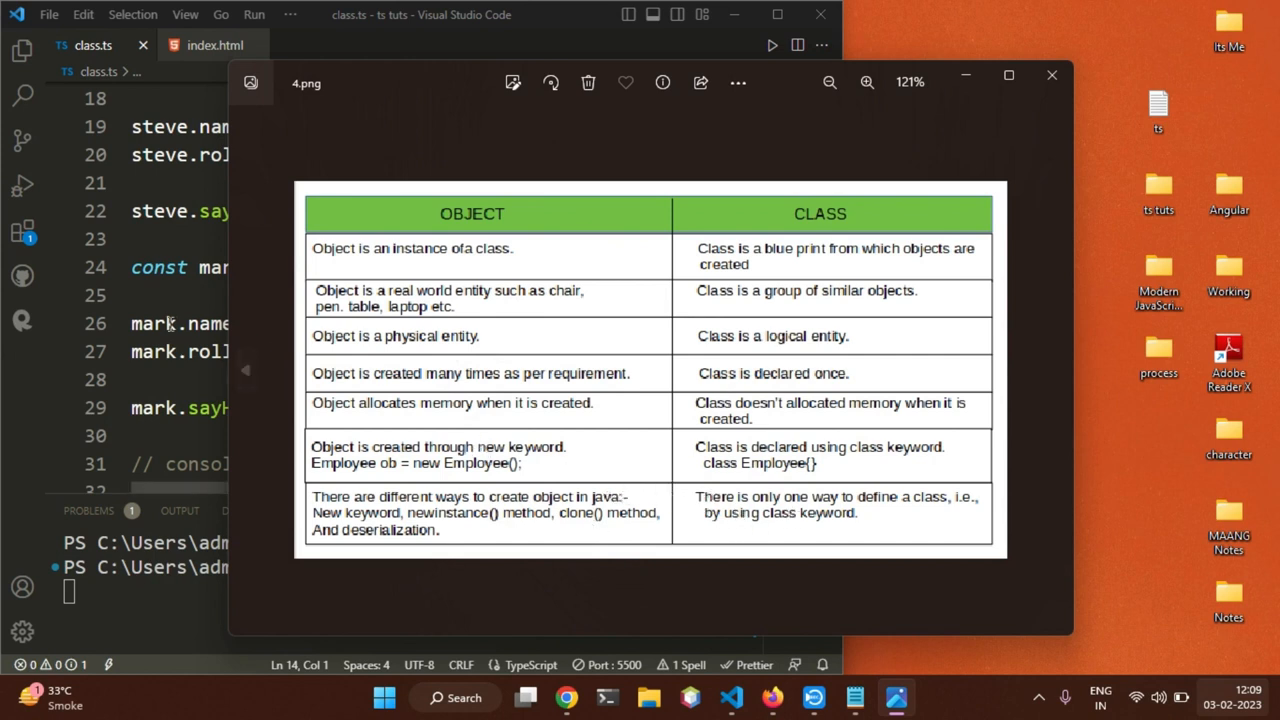
The closing table fixes the vocabulary across seven rows: object is an instance of a class while class is the blueprint objects are created from; real-world entity (chair, pen, table, laptop) versus group of similar objects; physical versus logical entity; created many times as needed versus declared once; allocates memory on creation versus allocates nothing when declared; created via new (Employee ob = new Employee()) versus declared via class (class Employee{}); Java offers several creation paths (new, newInstance(), clone(), deserialization) versus one definition path — the class keyword. New-keyword-only is the TypeScript-relevant row: new student() is how every object here was born.
// the table's TypeScript row
class Employee {} // declared once, no memory allocated
const ob1 = new Employee(); // physical entity, memory allocated
const ob2 = new Employee(); // created again as per requirement
The drill pass for 124’s theory pass — blueprint and instance, knows-versus-does, new Player() versus new student(), greet() versus sayHello(). The field annotations here (: string, : number) are the explicit-shape discipline 127 demands: without strictPropertyInitialization the uninitialized fields silently hold undefined at runtime despite their declared types, the passive-negligence pillar. (The video compiles with plain tsc class.ts, no strict config, so the declarations pass unchecked.) The IUser modeling in 128 upgrades this video’s student with extends plus is-guards so instances narrow safely instead of by convention.
Prev: 125 — React TypeScript Tutorial 3, Typing Props · Next: 127 — Code Review, TypeScript Fundamentals
Transcript notes: Class, field, and variable names (Greeter, Circle, student, Employee, element, name, rollNo, elon, steve, mark, sayHello, findArea, findCircumference, scale, class.ts) verified against the editor and slide frames; the Hinglish delivery means prose quotes are frame-anchored and code is transcribed from pixels, not from the auto-transcript. frame-0001.png (desktop open) through frame-0008.png (contrast table). timestamps ~00:00 (desktop) through ~28:00 (table) across the ~29:17 runtime.