027 — Learn JavaScript: Full Course for Beginners (the JS prerequisite)
Full companion narrative for Learn JavaScript Full Course for Beginners — the freeCodeCamp JavaScript prerequisite: runtime, data types, var vs let vs const, strings, functions, and ES6 on-ramps
Video: 027 · Learn JavaScript - Full Course for Beginners · watch · ~3:27:00 · freeCodeCamp.org, instructor Bo Karnes
Source: this is a written companion to the video. Part of the Favorite TypeScript Videos curated path, module 00 (foundations). No TypeScript syntax in this lesson — it is the JavaScript prerequisite the rest of the path assumes.
the JavaScript prerequisite, in one course
The course assumes learners already know JavaScript (module 00: “transitioning from js to ts”), and this freeCodeCamp course is the canonical standalone path to that prerequisite: a full course following the freeCodeCamp.org JavaScript curriculum, from “how do you run JavaScript at all” through basic syntax, data structures, functions, control flow, and into ES6. Mine it for the sandbox-first habit and the JS mental models that TypeScript later constrains.
you do not install JavaScript; you open a browser
The opening move is deliberately disarming: “how exactly do you install JavaScript? Well, for the most part you don’t.” Every web browser runs JavaScript, so code written once runs on many devices and operating systems.
Four follow-along surfaces, in order of increasing structure: any code editor plus an HTML file with <script> tags opened in a browser (console shows hello world); the built-in editor on freeCodeCamp.org; CodePen (codepen.io create-pin, JS pane plus console); and Scrimba, where most of the course was recorded — Scrimba logs both to a popup and to the console panel, a quirk learners will see throughout.
// the first program in the course (console, CodePen, or Scrimba):
console.log("hello world");
Course-map note for module 00: this is the sandbox-first habit the path wants — run code in the cheapest available surface before reaching for tooling.
comments: // and /* */
Comments are lines JavaScript intentionally ignores — notes for humans, grayed out in the editor. Inline comments start with // and run to end of line; multi-line comments open with /* and close with */ and can span arbitrary text. The editor’s syntax coloring is the tell: running code is colored, commented text is gray.
var number = 5; // inline comment: ignored, grayed out
/* this is a
   multi-line comment */
number = 9; // back in color — this runs
seven data types and var / let / const
JavaScript provides seven data types, introduced top-down: undefined (declared but never assigned), null (assigned as nothing), boolean (true/false), string (text in quotes), symbol (immutable unique primitive, deferred), number, and object (key-value collections, deferred). Variables are “labels pointing to data,” “almost like a box you fill with anything.”
Three declaration keywords, with the history made explicit: var was for a long time the only way and is usable throughout the whole program; let is block-scoped to where it is declared; const can never be reassigned (attempting it errors). let/const depth is deferred to later in the course.
var myName = "Bo";
myName = 8; // var allows reassignment to a different type — TS will later forbid this

let ourName = "freeCodeCamp";
const pi = 3.14;
// pi = 3.0; // error: assignment to constant
declare vs assign vs initialize; console.log as probe
Declaring (var a;) only creates the label; assigning (a = 7;) fills it; doing both at once (var b = 2;) is declaring plus initializing via the = assignment operator (emphatically not an equality check). Uninitialized variables hold undefined until assigned. console.log is introduced as the inspection probe — log a variable at two points to watch it change from undefined to its assigned value.
var a; // declaration — value is undefined
var b = 2; // declaration + initialization
a = 7; // assignment, no re-declaration needed
b = a; // b now holds a's contents (7)
console.log(a); // 7
case sensitivity and camelCase
Variable and function names are case-sensitive: studlyCapVar vs studlycapvar are different bindings, and referencing the undeclared casing is an error. Convention is camelCase — first word lowercase, each subsequent word capitalized — and the lesson fixes a broken example live by normalizing all references to one casing.
arithmetic, increment/decrement, compound assignment
Operators are taught as a ladder, each with a console example: + - * / (the “star”/asterisk for multiply, slash for divide), ++/-- (add/subtract one), decimals/floats (any literal with a point; 2.5 * 2.0 yields 5, 4.4 / 2 yields 2.2), the % remainder operator (11 % 3 is 2, since 11 minus 9 leaves 2 — commonly used for even/odd checks), then the compound shortcuts +=, -=, *=, /= (“a shortcut that means the same thing”: a += 12 ≡ a = a + 12).
var myVar = 87;
myVar++; // 88
var remainder = 11 % 3; // 2
var a = 3;
a += 12; // 15 — adds and reassigns in one step
strings: literals, immutability, bracket notation
Strings are characters in single quotes, double quotes, or backticks (string literals). Strings are immutable: bracket notation can read the nth or nth-to-last character but cannot change it in place — myString[0] = "H" silently fails, so the whole string must be reassigned. Quotes-inside-strings motivates escaping and quote alternation.
var myString = "hello world";
myString[0]; // "h" — reading works
myString[0] = "H"; // silently does nothing: strings are immutable
myString = "Hello World"; // reassign the whole string instead
reusable functions
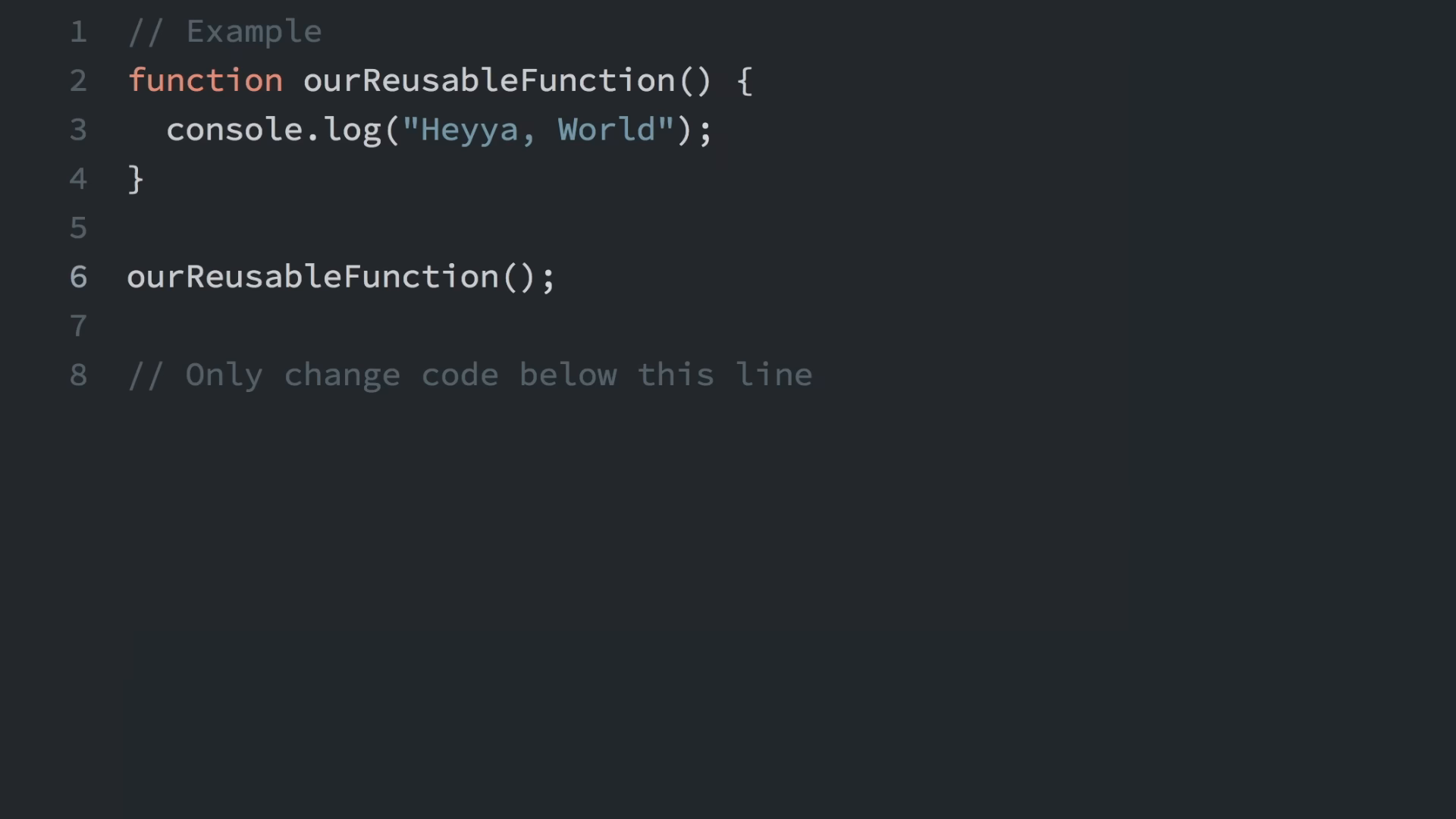
The course moves from inline statements to reusable functions — define once, call with different arguments — with a console.log wrapper as the running example.
chained conditionals: the testSize exercise
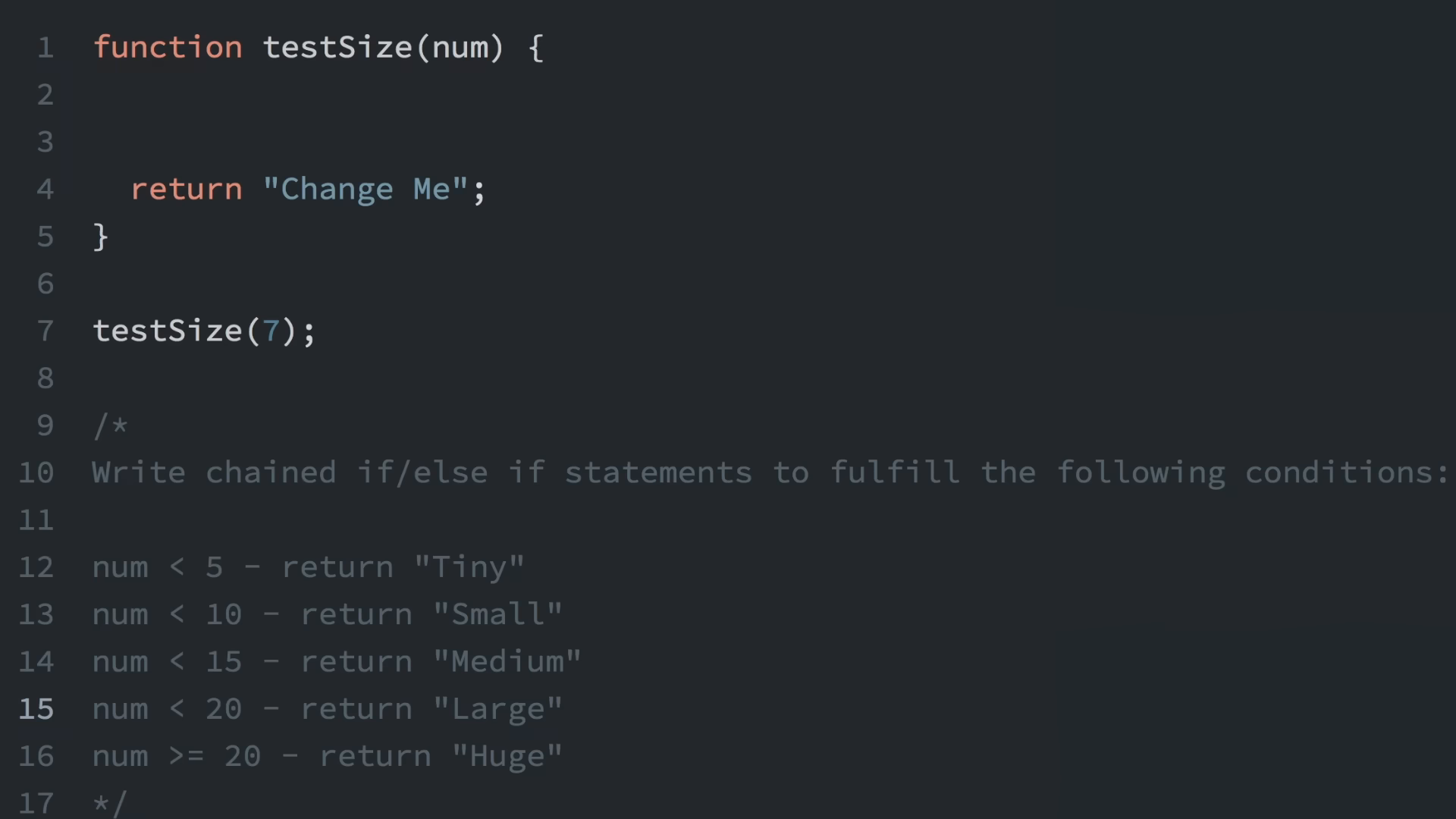
Comparing values leads to chained if/else if/else, exercised through testSize(num): Tiny through Huge labels selected by numeric ranges.
objects and for loops
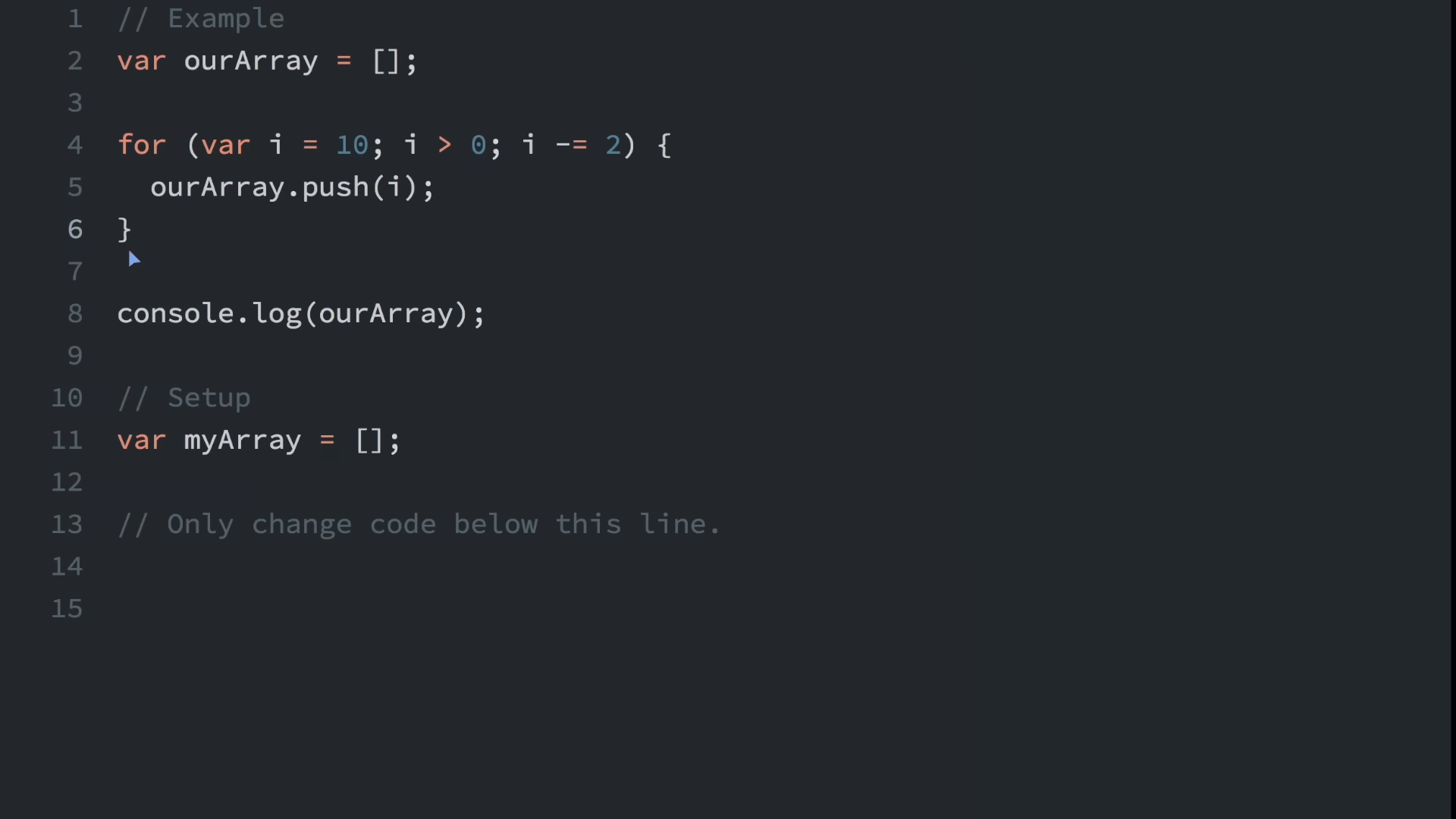
Object properties are read, updated, and added by key — then for loops build arrays by pushing countdown values, the first loop-driven data structure in the course.

var vs let scope, destructuring, strict mode
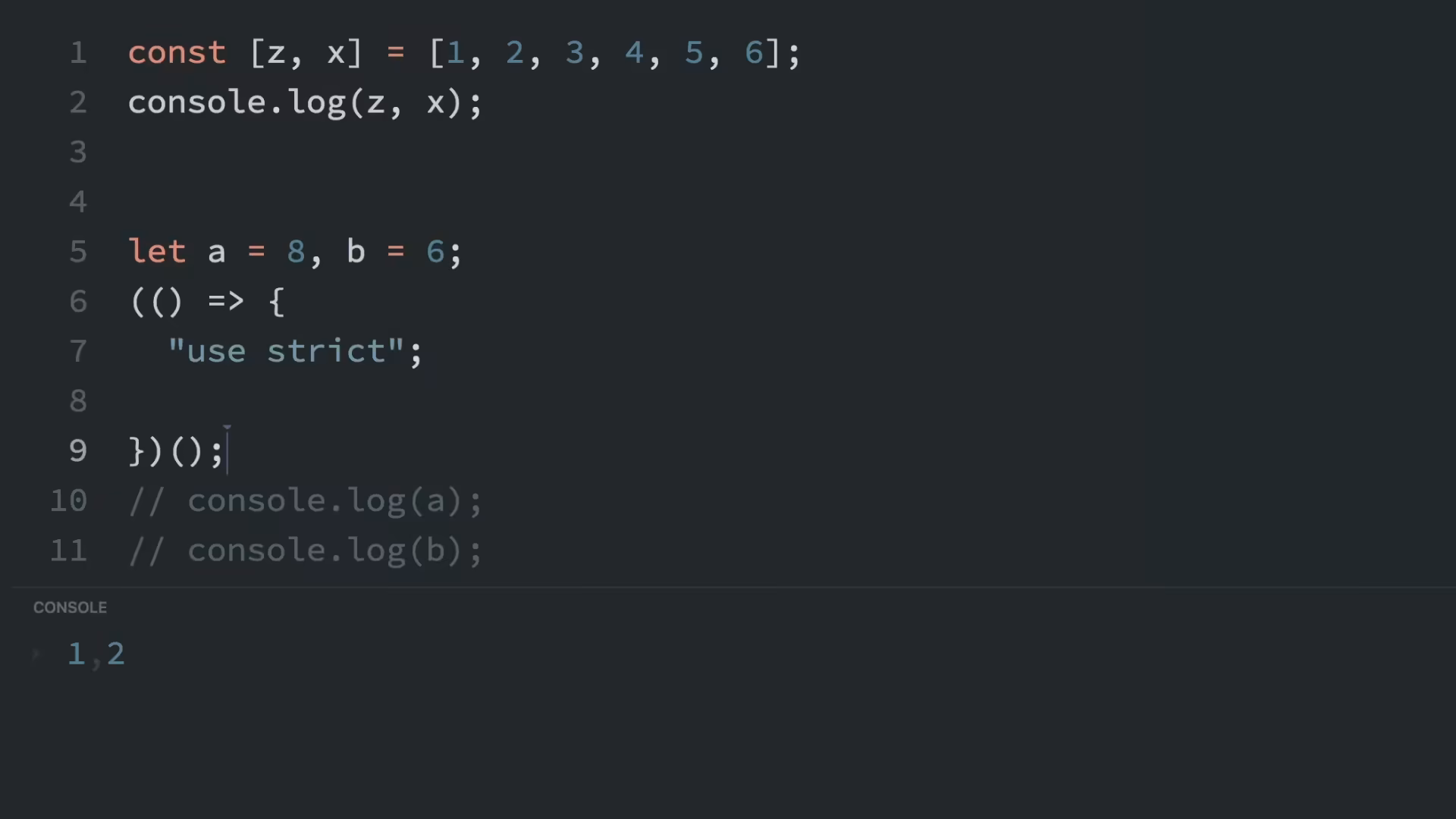
The closing beats per the frame captions: the var vs let scope comparison (function-scoped var against block-scoped let — the visual every later “prefer const/let” rule points back to), then array destructuring plus "use strict".

These later beats are indexed from the captioned frames — treat the captions as the topic index for deeper mining.
Next in module 00: 030 — 100+ JavaScript Concepts You Need to Know surveys the same ground in 12 minutes as a recall roundup.
Prev: 026 — #03 Variables in TypeScript | TypeScript Basics & Data Types | A Complete TypeScript Course · Next: 028 — Inheritance in JavaScript: Prototypal Inheritance
Out of scope for this companion: TypeScript types, tsc, DOM projects. Transcript corrections: var (not “VR”), CodePen (not “code pin”), freeCodeCamp, else statements, for loop, destructuring, curly braces {}. Later beats indexed from captioned frames.