010 — Function Signatures (pinning down params and return type)
Full companion narrative for TypeScript Tutorial — Function Signatures: the (params) => returnType contract, every-path returns, object-shape params, and type-alias composition
Video: 010 · TypeScript Tutorial - Function Signatures · watch · ~7:45 · Net Ninja TypeScript tutorial series
Source: this is a written companion to the video. Part of the Favorite TypeScript Videos curated path, module 04 (functions and generics). The direct sequel to 008: the loose
Functiontype becomes an exact contract. Names in signatures are positional, never nominal.
from loose Function to an exact contract
The previous video showed assigning the loose Function type to a variable so it can hold any function. This video goes one step further: a function signature pins down exactly which functions the variable may hold — what parameters it takes and what it returns.
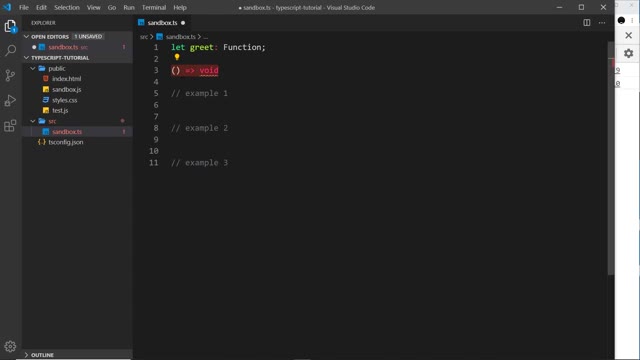
The signature syntax is a parameter list, an arrow, and a return type:
let greet: () => void;
Empty parentheses mean no arguments; void means nothing returned. Any function assigned to greet must match that shape exactly.
two strings in, void out (greet)
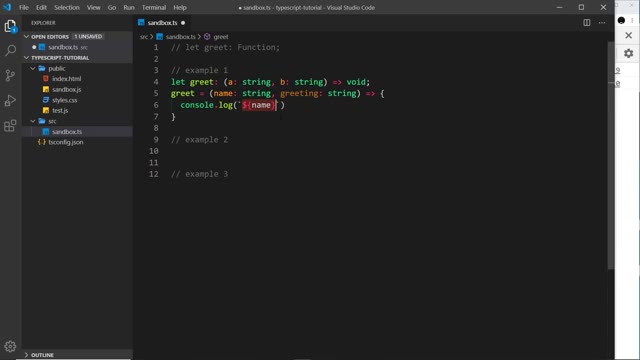
The first example declares a variable that must hold a function taking two strings and returning void:
// example 1
let greet: (a: string, b: string) => void;

greet = (name: string, greeting: string) => {
	console.log(`${name} says ${greeting}`);
};
Points the video makes against this example:
- The assigned function follows the signature, so there is no error: two parameters, both strings, nothing returned.
- Parameter names do not have to match. The signature says
aandb; the implementation saysnameandgreeting(orxandy— it does not matter). Only the count, order, and types must line up. voidis inferred. The implementation never writes a return annotation; because it returns nothing, TypeScript treats it as returningvoid, which satisfies the signature.- Break the match and it errors: change one parameter to
numberand the assignment stops matching the declared signature.
Template strings (backticks with ${...} interpolation) appear here for the first time. They are a JavaScript feature that works unchanged in TypeScript — a way to output variables inside the string itself.
a real return type (calc)
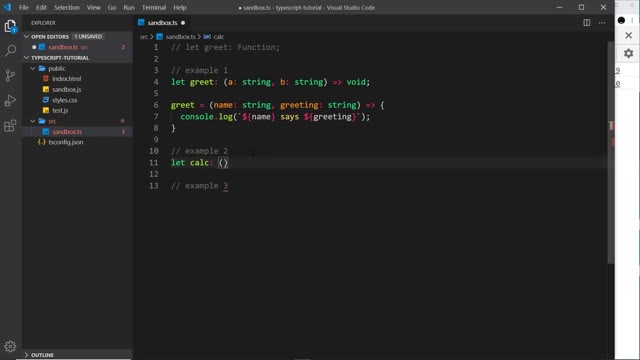
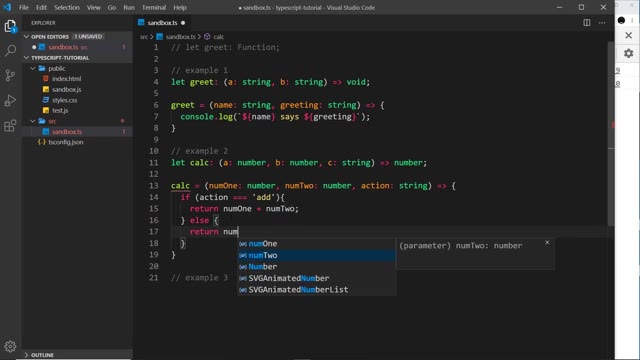
The second example takes three parameters and must return a number:
// example 2
let calc: (a: number, b: number, c: string) => number;

calc = (numOne: number, numTwo: number, action: string) => {
	if (action === "add") {
		return numOne + numTwo;
	} else {
		return numOne - numTwo;
	}
};
The teaching moment is the missing else. With only the if branch returning, TypeScript still errors: when action is not 'add' the function returns nothing, and the signature demands a number on every path. Adding the else branch guarantees a number is always returned and the error clears.
Two further notes:
- The return annotation on the implementation is optional. Because the body returns numbers, TypeScript infers the return type — writing
: numberexplicitly is allowed but redundant. - As before, mismatching any parameter type (a
stringwhere anumberbelongs, abooleanfor the action) breaks the signature and errors. The video demonstrates this, then changes the types back.
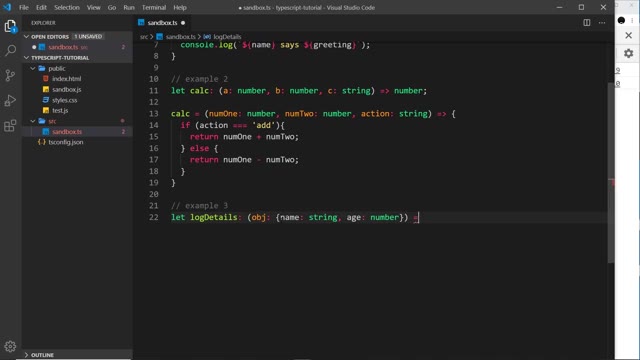
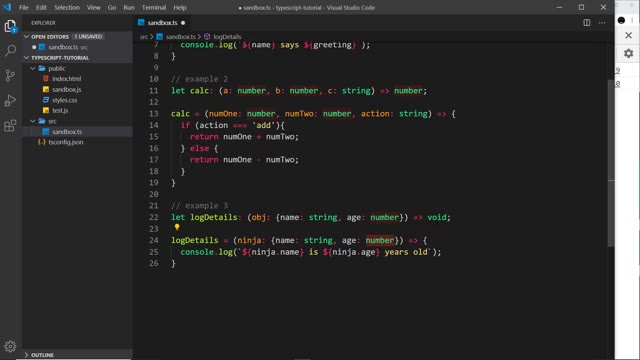
an object-shape parameter (logDetails)
The third example takes a single parameter that must be an object with a name (string) and an age (number), returning void:
// example 3
let logDetails: (obj: { name: string; age: number }) => void;

logDetails = (ninja: { name: string; age: number }) => {
	console.log(`${ninja.name} is ${ninja.age} years old`);
};
Again the parameter name is free: the signature calls it obj, the implementation calls it ninja. What must match is the shape — one parameter, an object with a string name and a numeric age — plus the void return (nothing returned). Anything else in that position is rejected.
reusing a type alias in a signature
The video closes by recalling type aliases (video 009) and applying one to the object shape from example 3:
type Person = { name: string; age: number };

let logDetails: (ninja: Person) => void;
This is still valid: Person names exactly the shape the signature requires, so the assignment matches without spelling the object out inline. The takeaway line: you can get as specific as you like with function types and signatures.
The outro lands the lesson in real project code, where the compiler forces a stricter choice — 011 — The DOM & Type Casting.
Prev: 009 — Type Aliases · Next: 011 — The DOM & Type Casting
Transcript notes: greet (not “greets”), calc (not “clock”), “TypeScript infers that”. Signature names never constrain implementation names — that interchangeability is the lesson. Frame-caption variants (sandboxes.ts, num1/num2, obj/object) resolve to the transcript audio. Generics arrive later in 018.