001 — TypeScript Tutorial for Beginners (setup, tsconfig, type fundamentals)
Full companion narrative for TypeScript Tutorial for Beginners — environment setup, first program, tsconfig, debugging, then primitives, arrays, tuples, enums, functions, objects, aliases, unions, intersections, narrowing, and nullables
Video: 001 · TypeScript Tutorial for Beginners · watch · 1:04:28 · Ultimate TypeScript course, first-hour beginners lesson (Mosh Hamedani)
Source: this is a written companion to the video. Part of the Favorite TypeScript Videos curated path, modules 00 (start) and 01 (fundamentals). Two parts: Part A is tooling and workflow (setup, first program, tsconfig, debugging); Part B is type fundamentals. All code below is reconstructed from the audio transcript except the literal-types frame noted at the end.
Tooling: setup, first program, and debugging
course premise and prerequisites
No TypeScript knowledge required. Required: basic JavaScript (variables and constants, arrays, objects, functions, arrow functions, destructuring). Method: watch every lesson in order, take written notes (keywords suffice), do the exercises at the end of each section.
what TypeScript is
TypeScript is a language built on top of JavaScript (a superset): every JavaScript file is a valid TypeScript file, plus extra features. Created at Microsoft to address JavaScript shortcomings for large-scale applications.
The headline feature is static typing: variable types are known at compile time. Statically typed languages (C++, C#, Java) fix a variable’s type at declaration; dynamically typed languages (JavaScript, Python, Ruby) resolve types at runtime and allow them to change.
let age: number = 20;
age = "twenty"; // ERROR: Type 'string' is not assignable to type 'number'
Beyond type checking: editors use known types for code completion and refactoring, and TypeScript lets you use future-JavaScript features before browsers implement them (they get compiled down).
Drawbacks (both stated explicitly):
- Compilation step (transpilation) — browsers do not run TypeScript, so
tscmust translate it to JavaScript. - More discipline required — slower for quick scripts; pays off on large multi-developer projects. Simple apps can stay vanilla JavaScript.
dev environment setup
Prerequisite: Node.js (from nodejs.org), for npm. Install the compiler globally so tsc works in every folder:
npm i -g typescript
tsc -v   # verify, e.g. 4.6.3 in the video; newer versions are fine
Editor: VS Code (code.visualstudio.com). Any editor works, but the course shortcuts assume VS Code. (code . opens a folder; drag-and-drop works if the code command is not on PATH.)
first TypeScript program
Project: new folder (e.g. hello-world on Desktop), opened in VS Code. New file index.ts — every TypeScript file uses the .ts extension. Plain JavaScript is valid TypeScript:
console.log("hello-world");
Compile with the embedded terminal (View > Terminal, Ctrl+backtick on Mac):
tsc index.ts # produces index.js next to it
TypeScript demo — annotate with colon syntax:
let age: number = 20;
age = "a string"; // ERROR: Type 'string' is not assignable to type 'number'
Delete the bad line, recompile. Key observation: the emitted index.js uses var instead of let and drops the annotation. Default tsc targets ES5 (ECMAScript 5, implemented in browsers for over a decade), and type annotations exist only for the compiler — they never appear in the output.
configuring the compiler (tsconfig.json)
tsc --init # creates tsconfig.json, mostly commented-out settings
Only a handful of settings matter; nobody memorizes all of them, and each has an inline description. Settings used in this video:
| setting | effect |
|---|---|
target | JS version emitted (e.g. ES2016+ keeps let) |
module | module system (e.g. commonjs) |
outDir | emit folder (dist) |
rootDir | sources folder (src) |
include / exclude | which files compile |
sourceMap | emit .js.map files for debugging |
strict (+ noImplicitAny, strictNullChecks) | type-checking strictness |
noImplicitReturns | every code path must return |
noUnusedLocals / noUnusedParameters | flag dead variables |
Workflow: set outDir to dist, then tsc alone compiles every file in the project into dist/.
debugging in VS Code
- Enable
sourceMapin tsconfig — the.js.mapfile records how each TypeScript line maps to generated JavaScript (machine-readable, not for humans). Recompile to produceindex.js.map. - Debug panel > “create a launch.json file”.
- Set breakpoints, press F5, step with F10 (step over), watch variables (e.g.
agechanging to 30) line by line.
Type fundamentals: primitives through nullables
JavaScript built-ins: number, string, boolean, null, undefined, object. TypeScript adds: any, unknown, never, enum, tuple (covered: any, enum, tuple here).
primitives and inference
let sales: number = 123_456_789; // underscores separate digits, readability only
let course: string = "TypeScript";
let isPublished: boolean = true;
Annotation is often unnecessary: the compiler infers the type from the initializer. Hovering sales after removing : number still shows number. Takeaway: annotate when declaring without initializing; otherwise let inference do it.
the any type (and why to avoid it)
An uninitialized declaration falls back to any:
let level; // implicitly any
level = 1;
level = "a"; // allowed - type safety lost
any is the escape hatch for converting JS projects where a real type is not yet known:
function render(document: any) {
	console.log(document);
}
Without the annotation, noImplicitAny (on via strict) errors: “parameter ‘document’ implicitly has an ‘any’ type”. The “nuclear option” — turning noImplicitAny off in tsconfig — silences this project-wide, but the video explicitly recommends against it: without type checking there is no point using TypeScript. Rule: avoid any wherever possible.
arrays
JavaScript arrays are dynamic (mixed element types allowed). TypeScript narrows them:
let numbers: number[] = [1, 2, "3"]; // ERROR at compile time, fix immediately
let numbers2 = [1, 2, 3]; // annotation unneeded, inferred number[]
let empty: number[] = []; // REQUIRED: [] alone infers any[]
Benefit beyond errors: IntelliSense. numbers.forEach(n => n.) offers all number methods because the editor knows n is a number — no equivalent in plain JavaScript.
tuples
A fixed-length array where each position has its own type. Use for pairs:
let user: [number, string] = [1, "Mosh"];
user = [1, "Mosh", true]; // ERROR: only 2 elements allowed
user = ["Mosh", 1]; // ERROR: order and types fixed
Index access is typed: user[0]. offers number methods, user[1]. offers string methods. Caveat: internally tuples compile to plain JavaScript arrays, so some invalid operations (e.g. pushing a third element) slip past the compiler — know the limitation.
enums
A list of related constants:
enum Size {
	Small,
	Medium,
	Large,
} // 0, 1, 2 by default
let mySize: Size = Size.Medium;
Assign explicit values to override (Small = 1, or strings). Prefer const enum: the compiler emits optimized code (a single assignment line) instead of the verbose generated lookup object. Logging an enum member prints its value (e.g. 2).
const enum Size {
	Small = 1,
	Medium,
	Large,
}
functions
Always annotate parameters and return types; the compiler then enforces arity (exactly the declared arguments, no more, no fewer):
function calculateTax(income: number, taxYear: number): number {
	if (taxYear < 2022) return income * 1.2;
	return income * 1.3;
}
- Optional parameter:
taxYear?: number(must come after required ones). - Default value:
taxYear: number = 2022(callers may omit it). noImplicitReturns: flags paths that fall through without returning — fix by annotating the return type and covering every branch.noUnusedLocals/noUnusedParameters: unused declarations get “declared but never read” warnings — delete them.
objects
Inline shape annotation with { }:
let employee: { id: number; name: string } = { id: 1, name: "Mosh" };
- Missing property at initialization errors (“property ’name’ is missing”).
- Cannot assign
null/undefined(strict null checks, next section). name?: stringmakes a property optional — but avoid it when the concept demands the field (an employee without a name makes no sense; use'').readonly id: numberprevents reassignment after creation.
Problems with inline annotations: shape duplication across objects (violates DRY), inconsistent shapes, harder reading. Fix: type aliases.
type aliases
One named place for a shape, PascalCase by convention:
type Employee = {
	readonly id: number;
	name: string;
};

let employee: Employee = { id: 1, name: "Mosh" };
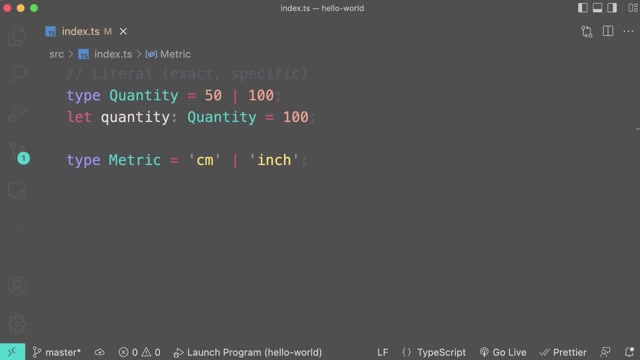
Also aliases for primitives/unions: type Quantity = 50 | 100;
union types
A parameter or variable accepting multiple types, joined with |:
function kgToLbs(weight: number | string): number {
	/* narrowing inside */
}
Used for nullable parameters too: name: string | null, extended to string | null | undefined when both are valid.
intersection types
Combine separate types with &; the result must satisfy all members:
type Draggable = { drag: () => void };
type Resizable = { resize: () => void };
type UIWidget = Draggable & Resizable;

let textBox: UIWidget = {
	drag: () => {},
	resize: () => {},
};
narrowing
Technique: narrow a union to one type before using type-specific members:
if (typeof weight === "number") return weight * 2.2;
else return parseInt(weight) * 2.2;
typeof guards (plus instanceof for objects) let the compiler treat the value as the narrowed type inside each branch.
nullable types and optional chaining
strictNullChecks (on via strict) forbids null/undefined where not declared — never turn it off. Pattern for possibly-absent values:
type Customer = { birthday?: Date };

function getCustomer(id: number): Customer | null {
	return id === 0 ? null : { birthday: new Date() };
}

let customer = getCustomer(1);
console.log(customer?.birthday?.getFullYear()); // only runs if present
Operators:
?.optional property access:customer?.birthdayyieldsundefinedinstead of crashing onnull.?.chains:customer?.birthday?.getFullYear().?.[]optional element access for possibly-null arrays.- Optional call:
log?.('hi')runs only iflogreferences a function.
Manual if (customer !== null && customer !== undefined) checks work but ?. is the idiomatic form.
Modules 00/01 covered: superset premise, static typing, setup (Node.js, global tsc, VS Code), first program with ES5 emit, tsconfig essentials, sourceMap debugging, inference, any avoidance, arrays, tuples with push caveat, const enum preference, function arity and params, objects, aliases, unions, intersections, narrowing, strict null checks with ?. chaining. Frame 22 (1:02:59) is the one code screenshot (literal types); frames 1-21 are talking-head shots and remaining code is reconstructed from audio. Transcript notes: Mosh Hamedani, codewithmosh.com, code.visualstudio.com, superset, tsconfig.json, dist/, let, tuple, type checking, catch these bugs, draggable/resizable, chaining operator.